01Ctrl + C
Copy as you always do.
Text, code, a link, an image, or a file. ClipOrigin saves it in the background, together with the app and window it came from.
Your clipboard remembers what. ClipOrigin remembers where. Find it, connect it, paste it — without losing your flow.
01EFFORTLESS, FROM THE START
A good idea shouldn’t disappear behind your next Ctrl+C. Keep it with its context, and come back to it when you need it.
Text, code, a link, an image, or a file. ClipOrigin saves it in the background, together with the app and window it came from.
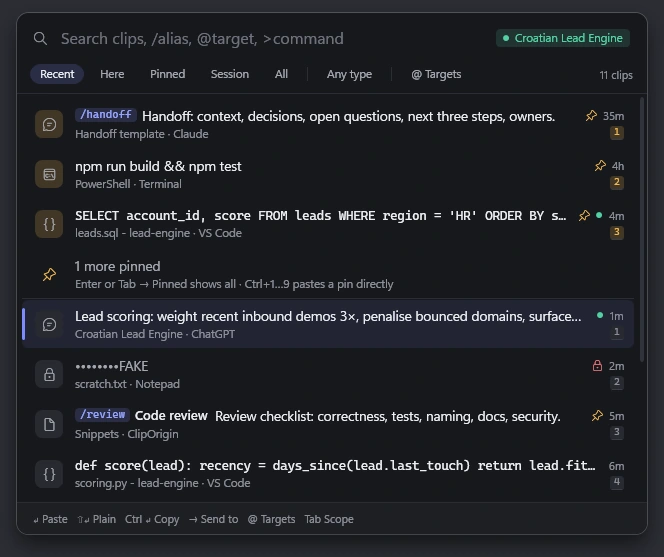
Bring up Quick Paste. Search by content, app, domain, or session. Preview a clip and check its source.
Paste into the app you’re working in. Pin the useful bits, build a paste stack, or jump back to the original page.
02YOUR WAY OF WORKING
From a quick paste to your full history. Choose an interface that follows your rhythm instead of interrupting it.
Search with words, or narrow it down with app:, domain:, type:, and is:pinned. Less scrolling. More finding.
With the optional Edge or Chrome companion, a clip remembers its exact tab or AI conversation. Open the source and pick up the story.
Nine themes, custom shortcuts, interface scaling, and English or Croatian. Make the little things work your way.
03BEYOND CLIPBOARD HISTORY
Code in your editor. Notes from your browser. An answer from an AI conversation. ClipOrigin keeps the thread between them, even as you move on to the next task.
Browser Companion is optional. Core copying, history, and pasting work without it.
04PRIVATE IS THE STARTING POINT
Your clipboard belongs to you. That’s why ClipOrigin stores data locally, without accounts, telemetry, or cloud sync.
History, search index, and thumbnails in an encrypted SQLCipher database. Windows protects the key for your user account.
Pause with one click. Exclude apps and sites. Private windows and known password managers are excluded by default.
No analytics or automatic content uploads. You initiate pasting and hand-offs to other apps.
05GOOD TO KNOW
Windows 11 (x64). It installs for your user account, without administrator rights. macOS and mobile versions are not currently available.
No. Capture, history, and source-app details work without it. The optional Browser Companion for Microsoft Edge and Google Chrome adds exact tabs, return-to-source, and Quick Targets. It currently requires manual installation through the app’s guided setup.
By default, ClipOrigin excludes known password managers, private windows, and content marked private by its source app. Text identified as a possible secret is masked and deleted after five minutes unless you choose to keep it. Detection is not infallible; use pause or exclusions for sensitive work.
Yes. Choose the Quick Paste palette, Cursor, Orbit, or Flip; one of nine themes; your own shortcuts; and interface scaling from 80 to 140%. The app and offline help are available in English and Croatian.
Downloads are not available yet. Once the app is ready for distribution, its installer will appear in the download section. For now, this website introduces the app and its features.
06YOUR NEXT CTRL+C
Give your clipboard a little more memory.
And your work a little more room.
The app is still in development. Its installer will be added here when it is ready for distribution.